Here’s the best way to set up OpenClaw without buying hardware, watching YouTube, deciphering tech talk and other gobbledygook.
Page Contents
OpenClaw is one of the most powerful personal AI tools I’ve ever used.
Once you set up OpenClaw, it connects in you computer browser though the ssh virtual private server tunnel. It also connects remotely to Telegram, Discord, Slack. Runs automation workflows. Works 24/7. Remembers context across conversations. Does things ChatGPT and Claude simply cannot do on their own.
Most people never get it working.
Wrong setup. Wrong machine. No skills configured. No app integrations. Just a blank screen and a lot of frustration.
The technical reality is real. Docker, SSH, SSL certificates, reverse proxies, server configuration. If you don’t know what those are, you hit a wall fast and you stay there.
So I fixed it.
You’ve seen what OpenClaw can do. You just need someone to get you there.
You’ve seen what it can do. The automations, the integrations, the fact that it works across Telegram, Discord, your browser, everything. You wanted it for yourself.
So you tried to set it up.
Maybe you got partway through. Maybe you hit a wall at Docker, or SSH, or the reverse proxy config that nobody explains properly. Maybe you found a guide but it was written for developers and skipped the parts that actually matter.
So you stopped. Told yourself you’d come back to it.
SETUPCLAW is the guide we built after going through every one of those walls ourselves. Every step documented. Every command copy-paste ready. Every common mistake flagged before you make it.
OpenClaw working on your own server. In one afternoon.
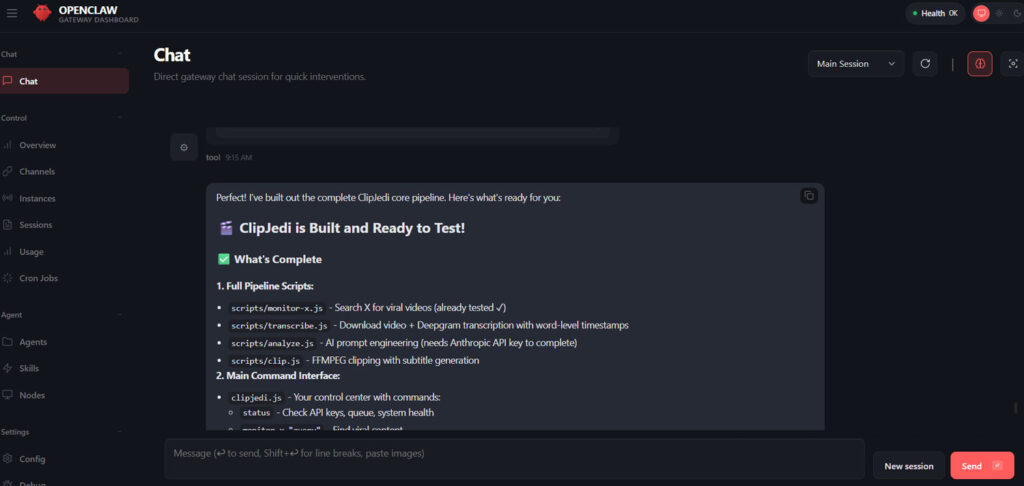
Working On A Video Clipping App In My Browser With OpenClaw
I spent hours hitting every wall so you don’t have to. The result is SETUPCLAW by ClawedPod. A 36-step guide that takes you from zero to a fully running OpenClaw instance, plus your own n8n automation server, on your own private cloud.
(Yes, you can finally run all those n8n JSON files you’ve been saving.)
Here’s what you get:
Copy-paste commands for every step. Video walkthroughs for the hard parts. An interactive dashboard that tracks your progress. Full Windows and Mac support throughout.
But that’s just getting it running.
You also get a full resource library for making it yours. Pick your skills. Choose your integrations. Gmail, Make, n8n, Telegram, Discord, whatever fits your workflow. I built the machine and handed you the keys. Now you get to soup it up however you want.
One afternoon. Your own OpenClaw. Actually working. Fully customized.
Every step has a built-in help panel with the most common issues for that exact step and how to fix them. And if you’re truly stuck, there’s an upgrade path. ClawedPod Pro lets us set it up for you for a one-time $150 fee. You can pick up right where you left off.
This guide was written for people who have never touched a server. Every command is copy-paste. Every decision is explained. If you can follow IKEA instructions, you can follow this.
Windows and Mac are both covered throughout. The guide flags every step where the two platforms differ. Both work.